
Settings
The Agent is configured from its own window and from the portal, never by editing files by hand. This page explains what is set on each side, how it updates itself and where it keeps what it needs.
Linking the computer to Zoan Cloud
Section titled “Linking the computer to Zoan Cloud”It is the only thing to configure on the computer. The first time you open the Agent, the linking screen asks for:
- Zoan Cloud URL: your portal’s (e.g.
https://acme.cloud.zoansoftware.com). - Machine Key: the key the portal shows when you create the machine with Nueva máquina (New machine) under Centro › Máquinas.
See Windows installation → Connect the Agent to Zoan Cloud for the detailed procedure.

The key is bound to that computer: if another computer tries to connect with it, the Agent warns that the key belongs to another computer. So a copied key is useless on another machine.
After linking
Section titled “After linking”The Agent window shows the status (Conectado, Conectando…, Sin conexión or Sin vincular: connected, connecting, offline, not linked), the Zoan Cloud instance, the mode (Atendido or Atendido y desatendido: attended, or attended and unattended), the version, the person’s Cuenta (Account) and two tabs:
- Procesos (Processes): the environment’s published processes, each with Ejecutar (Run) to launch it on this computer.
- Registro (Log): the Agent’s activity (connection with Zoan Cloud, executions), with Copiar registro (Copy log) to paste into a support ticket.
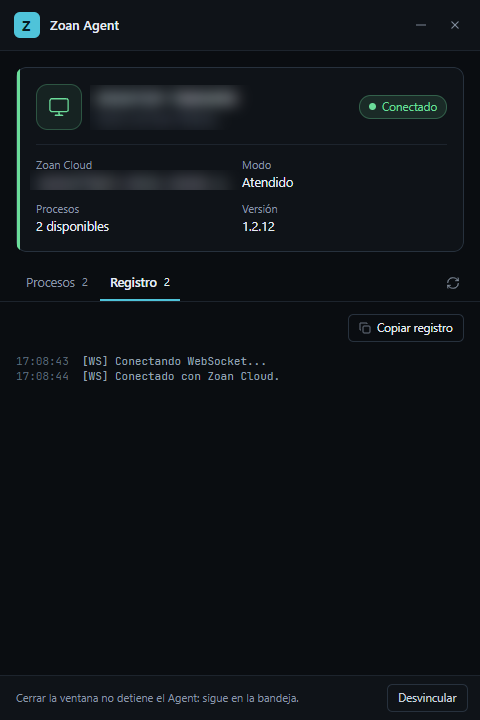
Closing the window doesn’t stop the Agent: it stays in the system tray.
The person’s account
Section titled “The person’s account”To see and run processes from the computer, the person clicks Iniciar sesión (Sign in). The Agent opens the browser on Autorizar Zoan Agent (Authorize Zoan Agent); they confirm with Autorizar and go back to the app, without typing their password in the Agent. Each execution runs in their name and requires their Robot atendido (attended robot) license (see Licenses). Cerrar sesión (Sign out) is on the same row; an execution in progress keeps running until it ends.
Since version 1.2.30, the Agent and Zoan Designer share the person’s session on the computer:
- If they already signed in to the Designer with the same Zoan Cloud, the Agent shows their processes without asking them to sign in or opening the browser.
- If the Agent window is open when they sign in or out of the Designer, it catches up on its own.
- Cerrar sesión (Sign out) in the Agent also signs them out of the Designer and of Zoan Cloud.
- Desvincular (Unlink) only signs them out of the Agent: the Designer keeps its session.
- Each Zoan Cloud has its own session, and the session belongs to each Windows user: on a server with several people connected, each one signs in with their own. It is stored encrypted and only that user can open it. The Agent service does not use it: it connects with the machine key.
- When updating to this version, the session they already had is kept.
What is managed from the portal
Section titled “What is managed from the portal”Under Centro › Máquinas, each machine’s ⋮ menu and detail let you:
| Action | What it does |
|---|---|
| Cambiar nombre (Rename) | The name you see in the portal. |
| Suspender / Reactivar (Suspend / Reactivate) | While suspended it accepts no new executions or queue items; what is scheduled with it waits in queue. Its key stays valid. It can’t be suspended while busy. |
| Regenerar clave (Regenerate key) | The current key is revoked immediately: the machine disconnects and doesn’t come back until you set the new one on the computer. Use it if the key leaked. |
| Desconectar ya (Disconnect now) | Cuts whatever is running right away and leaves the machine suspended. To use it again, regenerate the key and reactivate it. It is for emergencies. |
| Desvincular equipo (Unlink computer) | Frees the key from the current computer: the machine disconnects and the first computer that connects with that key gets linked. Useful when replacing a computer. |
| Eliminar (Delete) | Deletes the machine. |
Maximum sessions
Section titled “Maximum sessions”On a Windows Server with Remote Desktop, one machine can run several robot sessions at once. Its detail shows how many («Varias sesiones · hasta N a la vez», several sessions, up to N at once) and lets you set a Máximo de sesiones (Maximum sessions; empty = no maximum) so you don’t overload the server or exceed your Remote Desktop licenses. Under Al terminar (When done) you choose whether the robot’s session stays disconnected (the usual choice; the next run starts faster) or is signed out.
Versions and packages
Section titled “Versions and packages”The machine detail shows what it reports: system, Versiones instaladas (installed versions: Agent, Runner, Designer and updater), whether a newer version exists, the Actualización automática (automatic update) status and the Paquetes de actividades instalados (installed activity packages). Packages download on their own with the first execution that uses them.
Unlinking from the computer
Section titled “Unlinking from the computer”The Desvincular (Unlink) button at the bottom of the Agent window stops the computer from receiving processes and returns to the linking screen; to use it again it must be linked with a Machine Key. To switch instances (for example, from Testing to Production), unlink and link with the new URL and key.
Automatic updates
Section titled “Automatic updates”The installer turns on the Zoan updater (Zoan Update Service). It checks for new versions every few hours —sooner if Zoan Cloud announces one— and installs them when nothing is in use: the Agent updates when it has no executions running. It never closes anything on its own.
When an update is ready, the person sees an Actualización de Zoan lista (Zoan update ready) notice with Instalar ahora (Install now) or Más tarde (Later); if they do nothing, it installs itself once they stop using Zoan. It also appears in the tray menu as Actualizar: Agent vX. The connection to Zoan Cloud is kept.
Where it keeps what it needs
Section titled “Where it keeps what it needs”C:\ProgramData\Zoan\├── Agent\│ ├── agente.json ← Zoan Cloud URL, machine and environment│ ├── agente.key ← the Machine Key, encrypted│ └── logs\│ ├── service.log ← the service (unattended executions)│ ├── agent-ui.log ← the Agent window│ └── executions\ ← each execution's timeline├── packages\ ← installed activity packages├── automations\ ← projects downloaded to run└── updates\updater.log ← the updaterThe Machine Key is stored encrypted with Windows data protection, in a file only the system and administrators can read. That’s why copying the folder to another computer doesn’t work: link each computer with its own key.