
Credential management
Almost all automation needs access to systems that require a username and password: an ERP, a mail server, an API, a database. The problem is obvious: you should not write those passwords inside the playbook. If you do, anyone with access to the project sees them, they remain in the logs and changing them requires re-editing the automation.
Zoan Cloud credentials solve this. They store sensitive data encrypted within an environment, and your bots retrieve it at runtime by name, without the actual value ever appearing in the playbook or logs.
Create a credential
Section titled “Create a credential”- Pick the environment at the top right and open Centro › Recursos › Credenciales (Center › Resources › Credentials).
- Click New Credential.
- Give it a unique and descriptive name (e.g.
erp-produccion,smtp-notificaciones,gmail-api). This is the name by which you will reference it. - Add the data that the credential needs (see the two formats below).
- Guarda.
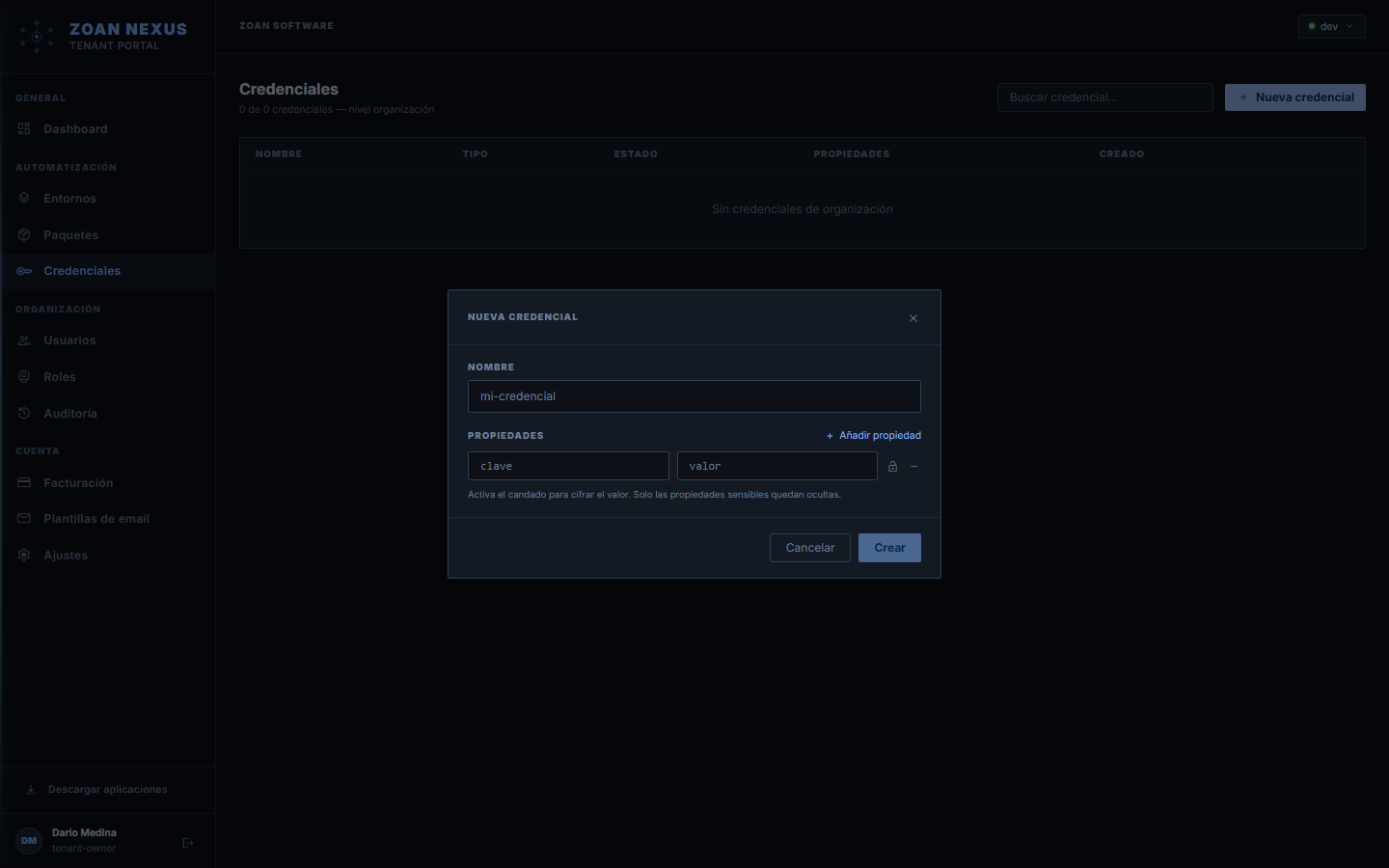
Dos formatos de credencial
Section titled “Dos formatos de credencial”Unique value
Section titled “Unique value”For a simple secret, such as a token or a single password. You read it with credential("nombre")["value"], or by passing credential("nombre") to a credential parameter.
| Field | Value |
|---|---|
| value | sk-prod-9f2a... |
Multiple fields (key-value)
Section titled “Multiple fields (key-value)”For systems that require multiple data together. Each field is retrieved by its key with ["campo"]. For example, a database connection:
| Key | Value |
|---|---|
host | db.miempresa.com |
user | nexus_user |
password | •••••••• |
database | produccion |
Service account key (Google)
Section titled “Service account key (Google)”For server-to-server authentication (e.g. a Google service account), store the full JSON key —exactly as downloaded from Google Cloud— as the single value of a credential. The activity references it by name and builds the authentication from that JSON.
Credentials live in an environment
Section titled “Credentials live in an environment”A credential belongs to the environment where you create it and is only visible to agents in that environment. This is intentional and very helpful:
- In Tests you aim for a test system; in Production, in real.
- The same playbook works in both without changes, because it references the credential by name (
erp), and each environment resolves its own value.
Playbook: = credential("erp") │ ┌──────────────┴───────────────┐Entorno "Pruebas" Entorno "Producción" erp → erp-test.com erp → erp.miempresa.comGlobals and inheritance
Section titled “Globals and inheritance”A credential can be global (the Credentials menu): it is inherited by every environment automatically, and a local credential with the same name shadows it in its environment. That is the sharing mechanism: what is common lives in global; what is specific overrides per environment. Each environment’s credentials tab also shows the inherited globals and whether they are shadowed.
Copying across scopes
Section titled “Copying across scopes”Every credential has a Copy to… action (to global or to another environment): the secret is re-encrypted server-side — it never travels through the browser — and if the name already exists in the target, the copy is rejected. There are deliberately no cross-environment “links”: a link from testing to production’s secret would break the isolation environments guarantee.
When you copy to another environment, the credential keeps its folder: in the target it lands in the folder with the same path (for example Finanzas/Pagos) and, if that folder doesn’t exist, the structure is created (you need permission to create folders in the deepest existing folder). Links to other folders are not copied.
Credentials in folders
Section titled “Credentials in folders”Each area can keep its credentials in its own folder: Purchasing’s in Purchasing, Payroll’s in Payroll. Each team manages its own secrets, its robots use them with no extra setup, and each person sees only what’s in the folders they get into.
- Create: under Centro › Recursos › Credenciales, pick the folder in the tree on the left and click Nueva credencial (New credential); it lands in that folder. What you create with the root selected serves the whole environment.
- View: in a folder you see its credentials (and its subfolders’) plus the ones linked to it from other folders, marked Vinculada desde … (Linked from …). At the root you see the root’s.
- Move: Mover a otra carpeta (Move to another folder) takes it elsewhere; you need to be able to edit it in its current folder and create in the target one.
- Unique names across the environment: two credentials can’t share a name in the same environment, whether at the root or in folders (case-insensitive). If the name is taken, the message says which folder the other one is in.
The credentials you already had stay at the root and work as before.
Who can do what
Section titled “Who can do what”The credential:list, credential:read, credential:create, credential:update and credential:delete permissions govern credentials and also integrations. What a person can do with a credential is the sum of their roles that cover it: those at the organization or environment root, and those on the credential’s folder. For someone who can’t get into that folder, the credential doesn’t show up.
Link from another folder
Section titled “Link from another folder”When two areas use the same system, the secret is stored once and linked to the folders that need it. When the password changes, all of them use the new one.
- In the tree, select the folder that will use it and click Vincular desde otra carpeta (Link from another folder).
- Pick the credential and confirm.
To link you need credential:create on the target folder and credential:read on the owning folder. From the target, credential:read is enough to view and test it; editing, moving or deleting it uses the permissions of its owning folder.
- A link applies to that folder, not to its subfolders: link each folder that uses it.
- Root credentials are already used by every folder, so they aren’t linked.
- Desvincular (Unlink, with
credential:deleteon the target folder) removes only the link; Eliminar (Delete) removes the credential from every folder.
Folders with credentials
Section titled “Folders with credentials”A folder that holds credentials can’t be deleted; if it only keeps the history of deleted credentials, it is archived. Archiving or deleting a folder removes the links to it.
In the audit log
Section titled “In the audit log”The audit log records credential.created, credential.updated (a move keeps the source and target folders), credential.deleted, credential.linked, credential.unlinked and credential.unusable_from_folder (a robot asked for a credential that sits in a folder it can’t reach). Anyone with audit:read sees every event; the folder is a filter.
Update a credential
Section titled “Update a credential”You can add, modify, or replace the values of an existing credential. The changes apply from the next run you use it; ongoing runs are not affected. You do not need to republish any packages.
Good security practices
Section titled “Good security practices”- Nombres descriptivos y consistentes:
erp-produccion,gmail-notificaciones. - One credential per system and per environment: do not reuse the same one in production and testing.
- Periodically rotates secrets updating only the value in the portal.
- Principle of least privilege: that the account behind the credential has only the permissions that the bot needs.
Next steps
Section titled “Next steps”- Using credentials in automations — how to reference them from a playbook.
- Environments — how to separate production and testing.