
Work queues
A work queue is a list of pending tasks that live on Zoan Cloud and are processed one by one by one or more bots. It is the standard RPA pattern to process batches of work in a robust, parallel and retry way: invoices to be validated, payments to be reconciled, emails to be classified.
The idea is to separate who produces the work from who executes it:
- A process (or an external system) queues items — each item is a unit of work with its data.
- One or more bots take items from the queue, process them and mark the result.
When to use a queue?
Section titled “When to use a queue?”A queue shines when work can be split into many independent units that are processed the same. Your process is a good candidate if you recognize several of these signs:
- High volume — hundreds or thousands of items (invoices, payments, records, documents).
- Items independientes — procesar uno no depende del resultado de otro.
- Benefits from going in parallel — you want to finish faster by dividing the work between several bots.
- Each item can fail on its own — and you want to retry only the ones that fail, not redo the entire batch.
- You need visibility or to meet an SLA — know how many are going, how many failed and why.
- Produced and consumed at different times — something is queued during the day and processed by bots at night.
Ideal processes
Section titled “Ideal processes”| Process | Why is it a good fit? |
|---|---|
| Invoice validation / registration | Thousands of invoices, each independent and retryable. |
| Payment or transaction reconciliation | Alto volumen, paralelizable entre varios bots. |
| Altas de empleados, clientes o proveedores (onboarding) | Each registration is an item; If a system fails, only that one is retried. |
| Document processing (OCR + capture) | Many documents; each one a transaction with its result. |
| Massive sending of emails, certificates or notifications | One item per recipient; retry only those that bounce. |
| Data extraction from many registries or portals | One item per record to consult. |
| Synchronization of orders between systems (ERP ↔ store) | One item per order; tolerates retries. |
When a queue is not needed
Section titled “When a queue is not needed”- A single and linear task (generate a report, do a download): a normal process is enough.
- Very few items and fast: the extra cost of coordinating the queue is not worth it.
- Steps that must run in strict order sharing state (they are not independent units).
- Interaction in real time with a person.
How does it relate to the rest?
Section titled “How does it relate to the rest?”A queue belongs to a environment (same as agents or credentials). The bots read and write it with the activities of the package Queue. The complete cycle:
flowchart LR
  P["Proceso productor<br/>(dispatcher)"] -->|Add Queue Item| Q[("Cola<br/>en Zoan Cloud")]
  Q -->|Get Queue Item| C["Proceso consumidor<br/>(performer)"]
  C -->|Set Transaction Status| Q
- The producer (or dispatcher) fills the queue with Add Queue Item.
- The consumer (or performer) takes items with Get Queue Item, processes them and reports the result with Set Transaction Status.
Create a queue
Section titled “Create a queue”- Pick the environment at the top right and open Centro › Robots › Colas (Center › Robots › Queues).
- Click New Queue.
- Complete the form:
| Field | What it is |
|---|---|
| Nombre | The identifier of the queue within the environment (it is the queueName that you will use in the activities). |
| Description | Free text so the team knows what it processes. |
| Reintentos máximos | How many times an item that fails is retried before giving it up as lost. By default 3. |
| Reintentar automáticamente al fallar | If active, an item marked failed (retryable) automatically returns to the queue until retries are exhausted. By default enabled. |
| Accept items automatically | If active, new items are ready to be processed without manual approval. By default enabled. |
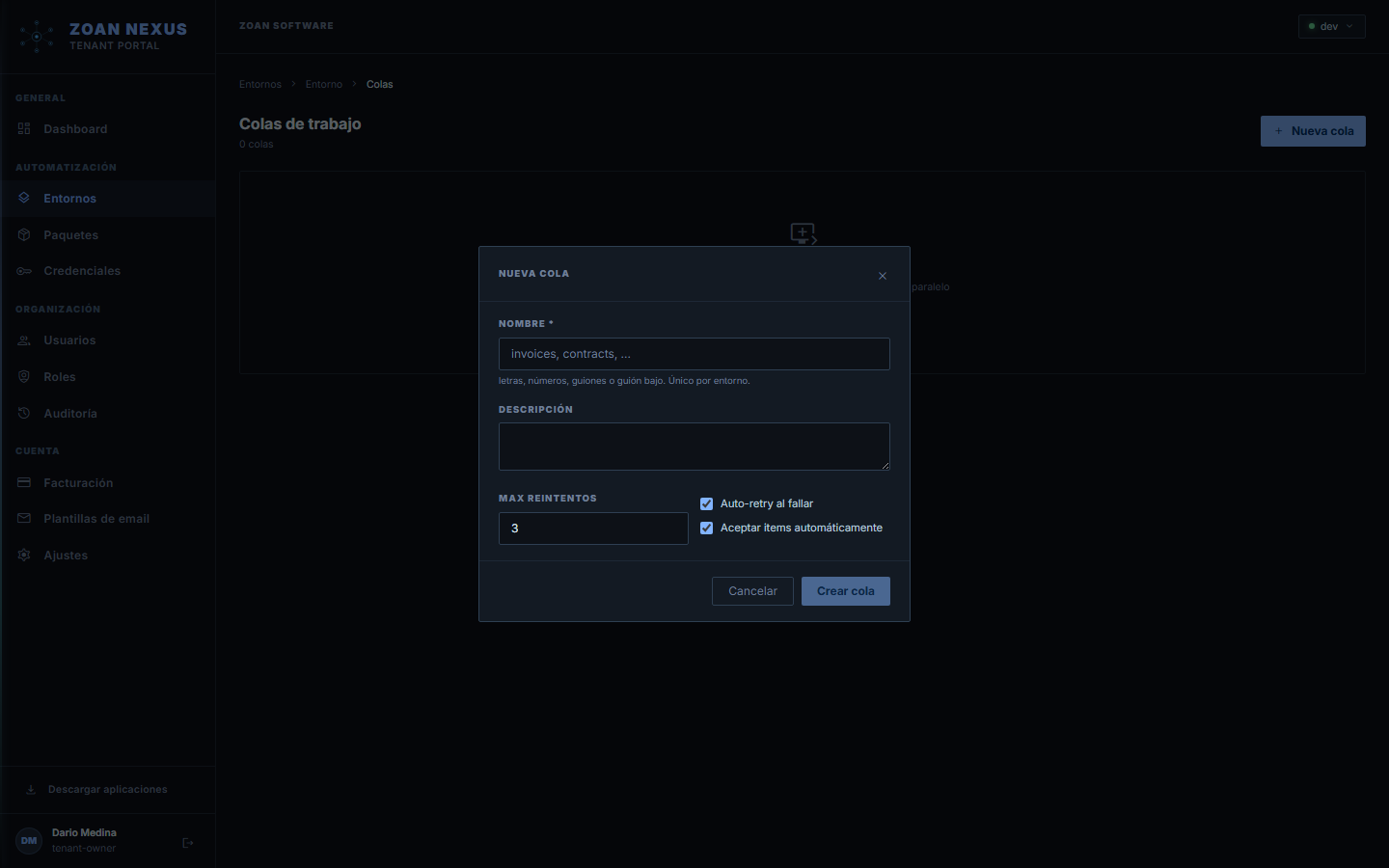
The name must match exactly the queueName that you put in the playbook activities, and the queue must exist in the same environment where the execution runs.
The view of the tail
Section titled “The view of the tail”When you open a queue you see its items and their status in real time: you can filter by status, see the detail of each item (its content, its output or its error) and consult metrics such as items/hour and time per item. You can also Add item manually for testing.

The life cycle of an item
Section titled “The life cycle of an item”Each item in the queue goes through these states:
| Estado | Significado |
|---|---|
new | Queued up, waiting for a bot to grab it. |
in_progress | A bot took it and is processing it (locked for that run). |
successful | Processed successfully. |
failed | Processed with error and no further retries available. |
retried | It failed but was retried (a new attempt was generated). |
abandoned | Discarded after exhausting retries or by intervention. |
review | Marked for manual review. |
The atomic lock is the key: when a bot takes an item with Get Queue Item, Zoan Cloud passes it to in_progress and no other bot can take it. That’s why several bots can read the same queue at the same time without stepping on each other.
Reintentos
Section titled “Reintentos”When an item is marked as failed, the behavior depends on the queue and the playbook:
- If the queue has Reintentar automáticamente al fallar (auto-retry) active and there are still retries left (Reintentos máximos), the item returns to the queue for another attempt. The item counter
Attemptskeeps track. - If retries are exhausted, the item remains
failed/abandonedpermanently. - The playbook can force a failure without retry (when the error does not make sense to retry, such as invalid data) by passing
retryable = falsein Set Transaction Status.
The producer/consumer pattern
Section titled “The producer/consumer pattern”The usual way to use queues is two processes:
- Dispatcher (producer): reads the source (an Excel, an SQL query, an API) and queues an item for each unit of work with Add Queue Item. It is usually launched with a programmed trigger.
- Performer (consumer): In a loop, grabs items with Get Queue Item until the queue is empty, processes each one and reports the result. You can run several performers in parallel (several agents) to speed up.
The complete example of both playbooks is in the Queue package introduction.
Next steps
Section titled “Next steps”- Flows from a queue — each item starts a case of a flow (robots, people, AI and integrations) and closes with its result.
- Queue Package — the activities to produce and consume queues.
- Environments — where queues live.
- Scheduled Triggers — to launch the dispatcher periodically.
Copying a queue to another environment
Section titled “Copying a queue to another environment”Every queue has a Copiar cola a otro ambiente (Copy queue to another environment) action: it copies the definition (name and configuration), never the items — a testing bot consuming production work is exactly what environment isolation prevents. This is what makes a global extraction project’s output queue work: resolution is by name in each document’s environment, so the same-named queue in every environment is all it takes, each with its own work.